Discovery: Publishing an Article Is Half the Job. Getting It Found Is the Other Half.
· 7 min read · Pulsar Interactive ·
Short answer
When we publish an article, our website does the search work by itself. Within minutes the post is live, listed in the sitemap and the feed, and sent to Bing's index. The page then builds its own answer box, FAQ, table of contents and structured data from plain headings in the text. A clean Markdown copy is also published for AI assistants. The writer only writes. The template takes care of how Google and AI search read the page.
Writing a good article is half the job. The other half is making sure search engines and AI assistants find it, understand it and quote it correctly. Most small business blogs skip that half. The post goes up, nobody tells Google, the page has no structure a machine can read, and it sits unseen for weeks.
We wrote earlier about the article engine we use to draft, translate and publish across our brands. This post covers what happens next: what our own website does with an article once we press publish.
Why this matters for your business
An ad stops working the day you stop paying for it. An article that ranks keeps working long after it's written. A post that answers a question your customers really ask can bring in visitors for months, and each of them costs nothing extra. That's why getting the "being found" part right matters as much as the writing.
It shows up in your business in four places:
More visitors without more ad spend. Each post is another page Google and Bing can show when someone types a question you answer. As posts add up, the blog becomes steady traffic you don't pay for per click.
Better leads. Someone who arrives on a post about their exact problem already knows what you do before they contact you. Those conversations start further along than a cold call or a click on an ad.
A place in AI answers. When ChatGPT or Copilot explain a topic or suggest who can help, they name the pages they read. Being one of those pages puts your name in front of a buyer at the moment they're deciding.
Trust before the first call. A prospect who has read two or three useful posts arrives already trusting you, which makes the conversation about price easier.
None of this happens overnight. Search results usually take weeks to months to settle, and the gains grow as posts pile up. Fast indexing and clean structure don't replace good writing. They make sure good writing doesn't go to waste.
How to tell it's working
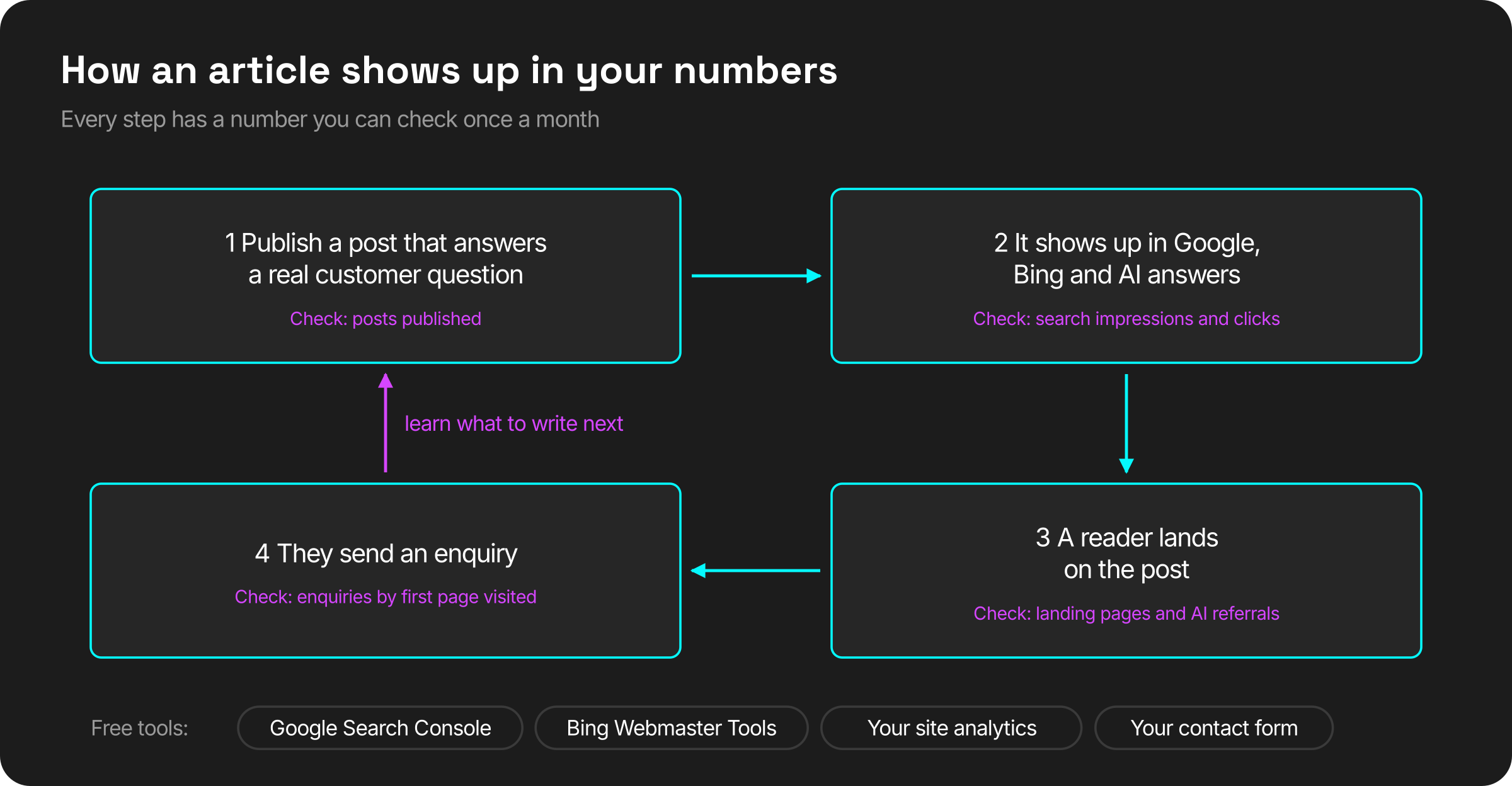
You don't need a big analytics setup. Check four things once a month:
Search clicks and impressions in Google Search Console and Bing Webmaster Tools, both free: are more people seeing your pages in results, and clicking them?
Visitors who land on a blog post first: which articles actually bring people in.
Enquiries that started on a post. On our site, every contact form records the page the visitor first landed on and the site that sent them, so we can see which article led to which conversation.
Visits from AI assistants: traffic from chatgpt.com, perplexity.ai or copilot.microsoft.com in your analytics.
If those four rise together, the articles are paying for themselves. If clicks rise but enquiries don't, the posts are drawing the wrong readers, and that tells you what to write next.
Each step has its own number. Watch all four together, not just traffic.
What happens when we press publish
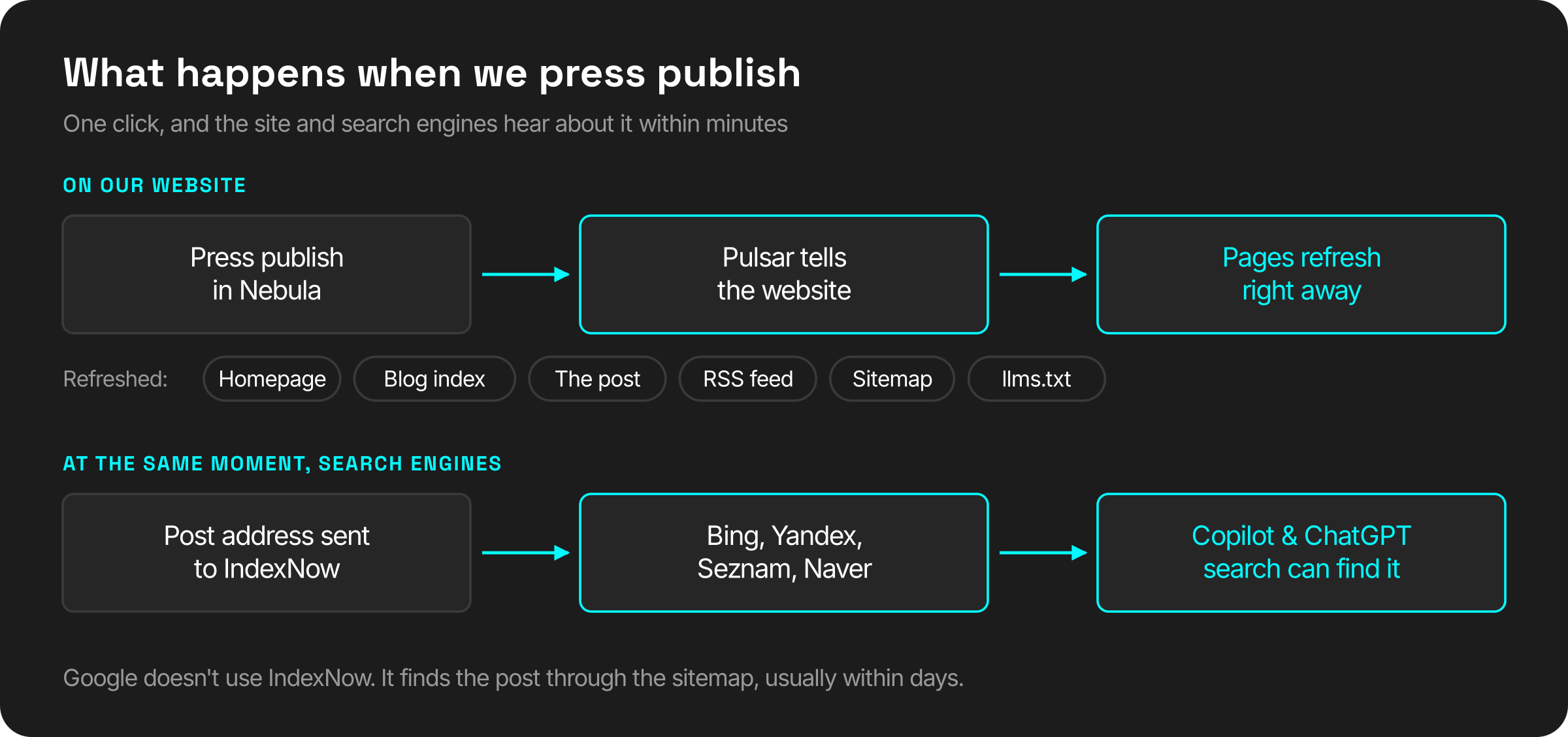
The site is told right away. Our pages are cached for speed and normally refresh every hour. Publishing sends a signal to the website to refresh now: the homepage, the blog index, the post itself, the RSS feed, the sitemap and our AI reading list (more on that below).
Search engines are told too. The new address goes to IndexNow, a free service that tells Bing, Yandex, Seznam and Naver a page has changed. Bing also feeds Copilot and ChatGPT search, so a post can be crawled in minutes instead of days.
The sitemap uses real dates. Each post is listed with the date it was last updated, so a search engine knows when an old post is worth checking again.
One click refreshes the site and notifies search engines within minutes.
Before publishing, an SEO assistant suggests a search title (up to 70 characters), a description (up to 180), a summary, a web address and tags. We can ask it to make a suggestion shorter, include a keyword or sound less salesy. It only suggests. A person picks what gets saved.
What the page does on its own
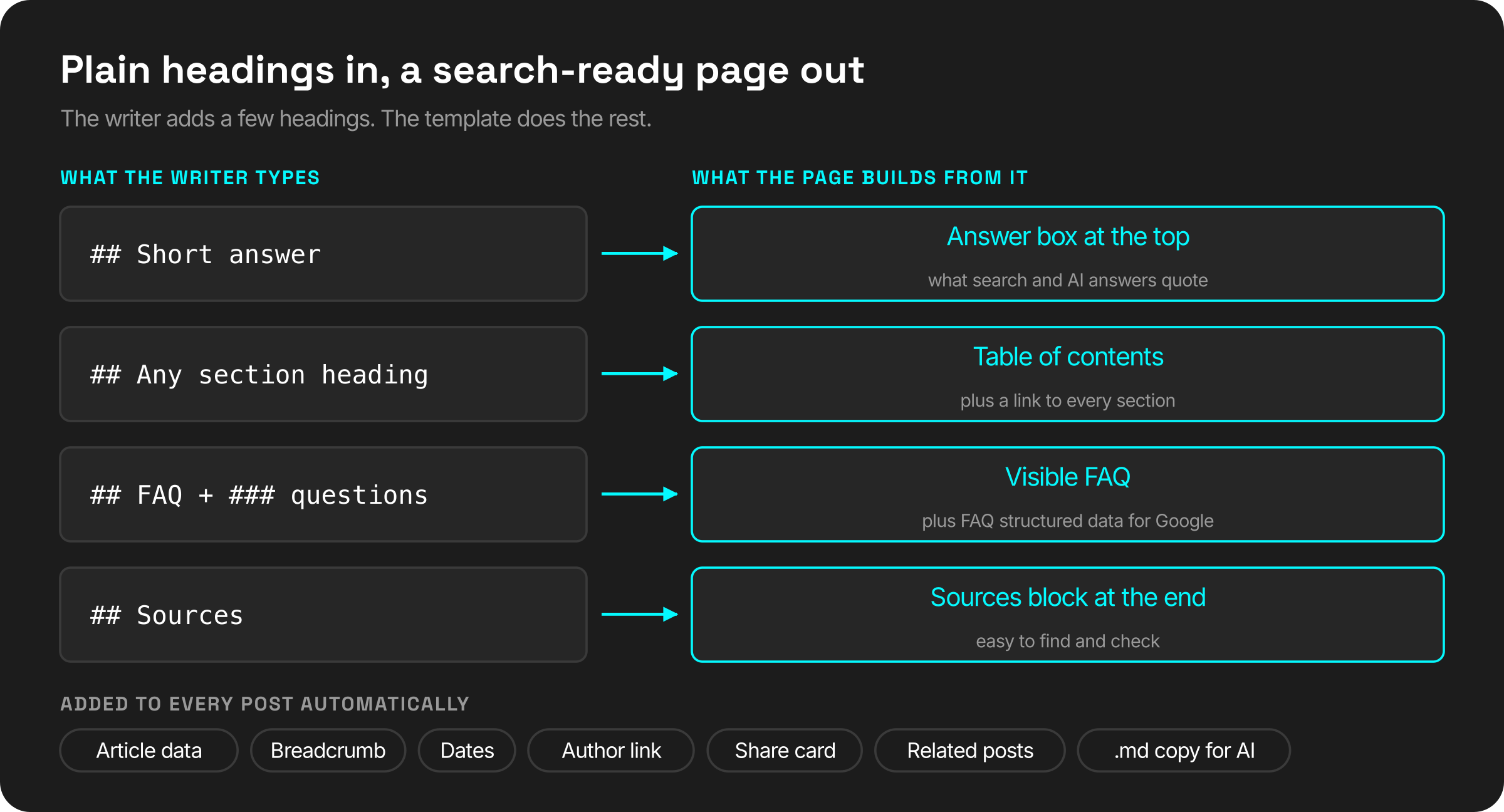
The writer doesn't touch any code. A few plain headings in the text are enough for the page template to do the rest:
A "Short answer" heading becomes an answer box at the top of the page, like the one on this post. Search engines and AI assistants look for a clear, direct answer to quote, so we give them one.
A "FAQ" heading with questions under it becomes a visible FAQ and the matching structured data. Structured data is a hidden label that tells Google "this is a question, this is its answer".
A "Sources" heading becomes its own block at the end, so the references are easy to find and check.
Every section heading becomes a table of contents with a link to that section, so an AI answer can point to the exact paragraph.
The page describes itself to machines: article title, author, publish and update dates, word count, topic and a breadcrumb trail (Home › Blog › this post). The author's name links to their profile page, which helps search engines judge who is behind the content.
Sharing works properly. Links pasted into LinkedIn, WhatsApp or Slack show a proper card with the title, summary and cover image.
Readers keep reading. Read time, update dates and two related posts, matched by shared tags, are added automatically.
The writer adds a few headings. The template does the rest.
Written for AI readers too
More people now ask an AI assistant instead of searching. Those assistants read pages in a hurry, and menus, buttons and scripts get in their way. So every post on our blog has a second version: the same article as plain text, at the same address with .md on the end. That copy points to the real page as the original and is kept out of search results, so it never competes with it.
All posts are also listed in llms.txt, a short reading list at the root of our site that tells AI tools what we publish and where to find the plain copy.
What we learned
1. Structured data must match what the reader sees. We only add FAQ data when the page shows an FAQ. Labels that describe content nobody can see are a quick way to lose Google's trust.
2. A small outage shouldn't cost a ranking. Our articles come from a separate content system. If it's briefly unreachable, the site keeps showing the last good version of the page. If it can't, it returns a "try again" error rather than "page not found", because a "not found" tells Google the post is gone, and it drops it.
3. IndexNow isn't a shortcut to Google. Google doesn't use it, and still finds pages through the sitemap on its own schedule. It's still worth having: Bing's index is what Copilot and ChatGPT search draw on.
4. Only safe content gets in. Articles can contain images, video, YouTube and Vimeo embeds and tables, and nothing else. That's checked when an article is saved and again when the page is shown, so a mistake in a draft can't break the site or slip in something unsafe.
Who this is for
Businesses that publish regularly and want each post to count, without hiring an SEO person for every article.
Teams writing in more than one language, where every version needs the same structure.
Anyone whose customers ask ChatGPT or Copilot before they ask Google.
We can set this up for your site
We connect your articles to a website that handles the search work for you: fast pages, structured data, instant indexing and a version AI assistants can read. Your team keeps writing in plain text, and a person still decides what goes live.
Do I need to know SEO to write for a site like this?
No. You write normally and add a few plain headings, such as "Short answer" and "FAQ", where they fit. The page template turns them into the answer box, the FAQ and the structured data.
How fast does a new post show up in search?
The site updates the moment you publish, and Bing is notified within minutes. Google works on its own schedule, usually within days, helped by an accurate sitemap.
Does this work with my current website?
It works best when the blog pages are built by the site itself, as ours are with Next.js. If your site runs on a closed website builder, we look at what it allows first and tell you honestly what's possible.
Sources
IndexNow, "How it works": https://www.indexnow.org/
A visa guide for Latinos en Tailandia showed how one article engine, connected to Claude through an MCP, lets teams across separate brands research, translate, correct and publish together—with a person deciding what goes live.
From our R&D lab: how we connected live audio analysis in Pure Data to visuals in any browser, built a phone remote for TouchDesigner, and why we chose a web stack we own over putting one tool at the centre.